
This feature allows you to play a recorded message to a caller while phones are ringing in a ring group. You can assign a unique greeting to each incoming ring group, and configure a second message to follow after the first has repeated a specified number of times.
When a call is answered, the message stops and the caller is immediately connected.
Get Connected with PCPro
This procedure requires access to the NEC SL2100 using the PCPro Programming Software.
To download PCPro or learn how to connect to the phone system, refer to:
How to Connect to the NEC SL2100 or SL1100 Phone System for Programming
⚠️ Tip: This feature uses built-in VRS messages. Each NEC SL2100 system supports up to 100 VRS messages.
Recording the VRS Messages Using a Phone
⚠️ Tip: Our NEC SL2100 phone systems come preloaded with an on-hold message in VRS Message 001. So, in the steps below, we recommend beginning with VRS Message 002 in order to avoid overwriting the on-hold message.
From any extension on the SL2100, use the following dialing codes:
- Dial 616 + 7 + XXX to record a message
- Dial 616 +5 +XXX to listen to the message
- Dial 616 +3 +XXX to erase the message
Replace XXX with the VRS message number (e.g., 002, 003, etc.)
Example Message 1:
“Thank you for calling ABC Company. Your call will be answered shortly.”
Example Message 2:
“All of our customer service reps are currently assisting other clients. Please hold for the next available representative.”
Programming Steps
Trunk Setup
- Go to Program 22-02: Incoming Call Trunk Setup
- Set Mode 1 (Day Mode) to Normal

Message Setup and Playback Options
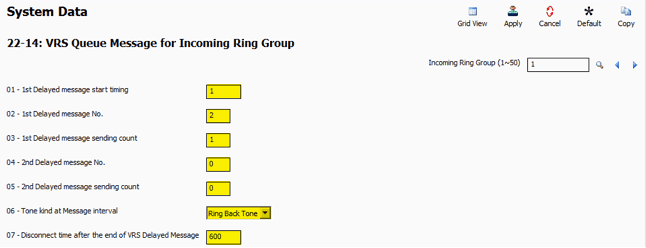
- Go to Program 22-14: VRS Queue Message for Incoming Ring Group
- Use the Incoming Ring Group search field to navigate to the desired ring group

Configure the following fields:
| Program | Description |
|---|---|
| 22-14-01 | Number of rings before the first message plays. Set to 1 for fastest playback. (0 = off) |
| 22-14-02 | VRS message number for the first greeting |
| 22-14-03 | Number of times to repeat the first message |
| 22-14-04 | VRS message number for the second greeting (optional) |
| 22-14-05 | Number of times to repeat the second message |
| 22-14-06 | Audio source after all messages play (options: Ring Back Tone, MOH tone, or BGM source) |
| 22-14-07 | Disconnect timer if the call is not answered (recommend setting to 600 seconds) |
- Apply and upload your changes
Call Flow Behavior
Incoming calls follow the timers and destinations defined in the following programs:
- Program 22-01-04 – Ringing timer before forwarding
- Program 22-08 – Destination after the timer expires
⚠️ Tip: To allow time for the call to be answered while the greeting plays, set a high value in Program 22-01-04. This keeps the caller in the queue.