
Toll restrictions allow or prevent specific numbers from being dialed out. This Tech Tip demonstrates how to assign a toll restriction class to an individual extension. This applies to the NEC SL2100 and SL1100 phone systems.
Get Connected
This procedure requires access to the NEC SL2100 using the PCPro Programming Software.
To download PCPro or learn how to connect to the phone system, refer to:
How to Connect to the NEC SL2100 or SL1100 Phone System for Programming
Example Overview
In this example, we will create a toll restriction class for Extension 101 that only allows dialing 911. All other dialing will be blocked using the wildcard restriction.
Programming Steps
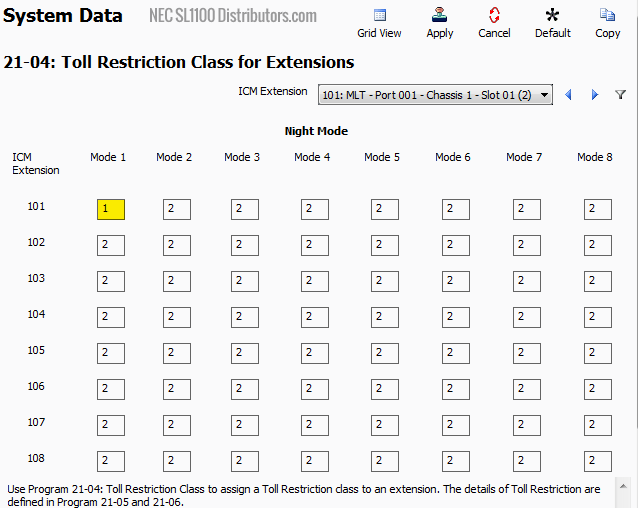
- Go to Program 21-04: Toll Restriction Class for Extension
Mode 1 will be our “Day Mode,” and Mode 2 will be our “Night Mode.”- Set the value of Mode 1 to
1for Extension101
- Set the value of Mode 1 to
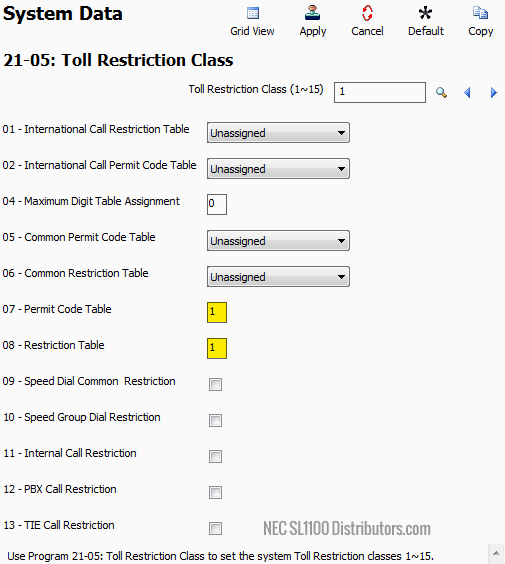
- Go to Program 21-05: Toll Restriction Class
- Set 21-05-07: Permit Code Table to
1 - Set 21-05-08: Restriction Table to
1
- Set 21-05-07: Permit Code Table to
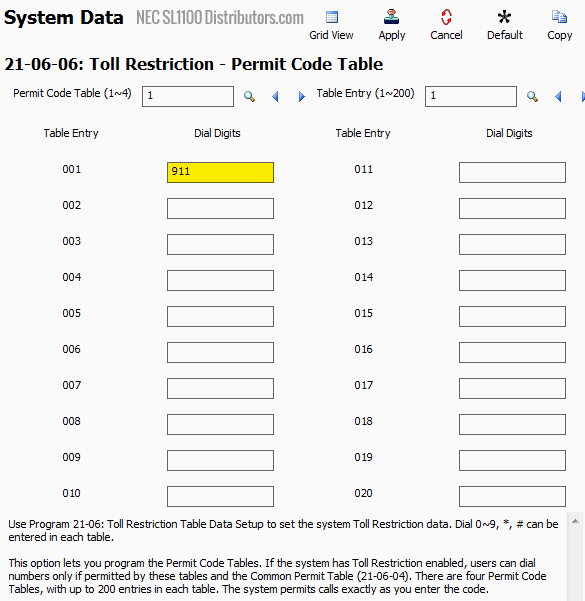
- Go to Program 21-06-06: Toll Restriction – Permit Code Table
In this program, all tables and entries are blank by default. You may create up to 4 different Permit Code Tables, each with up to 200 entries.- For Table Entry
001, set the Dial Digits to911
This allows dialing of 911 only.
- For Table Entry
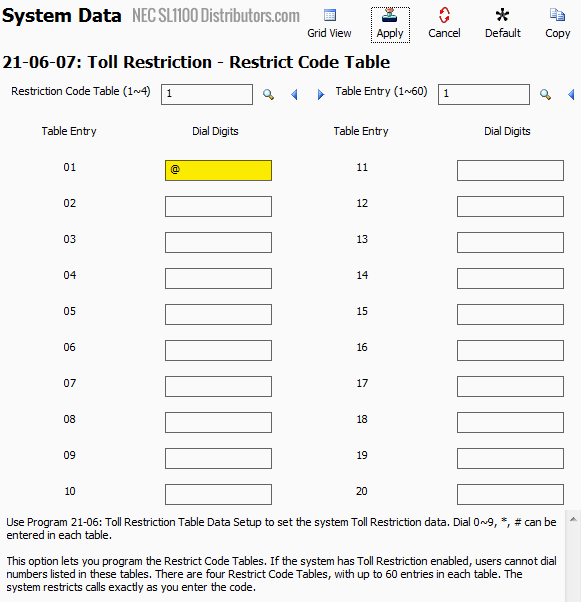
- Go to Program 21-06-07: Toll Restriction – Restrict Code Table
This program allows you to define up to 4 Restriction Tables with up to 60 entries each. It supports wildcards for broad restrictions.- For Table Entry
01, set the Dial Digits field to@
The@symbol is a wildcard that blocks any digits not explicitly allowed in the permit table.
- For Table Entry
- Apply and upload your changes
⚠️ Note:
Using the @ wildcard blocks all outbound dialing except for numbers explicitly permitted. In this example, only 911 will be allowed.