
This Tech Tip will show how to change the default 100 series numbering to 300 series numbering. This also includes changing the voicemail pilot number. This tip applies to the NEC SL2100 and NEC SL1100.
Get Connected
This procedure requires access to the NEC SL2100 using the PCPro Programming Software.
To download PCPro or learn how to connect to the phone system, refer to:
How to Connect to the NEC SL2100 or SL1100 Phone System for Programming
PCPro Programming Steps
Set Department Group Dialing Plan
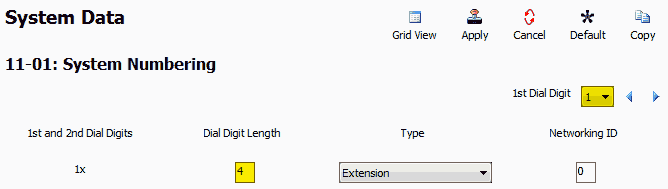
- Go to Program 11-01: System Numbering
- Set the 1st Dial Digit dropdown to
1 - For 1x, set the Dial Digit Length to
4Example: 1001, 1002, 1003, etc.
Set Station (Phone) Dialing Plan
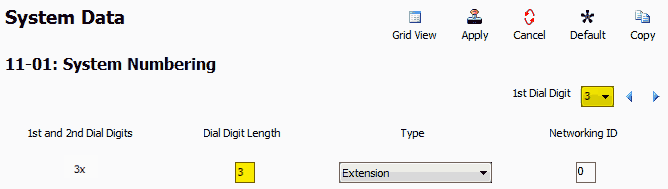
- Stay in Program 11-01
- Set the 1st Dial Digit dropdown to
3 - For 3x, set the Dial Digit Length to
3Example: 301, 302, 303, etc.
Reset Department Group Pilot Numbers
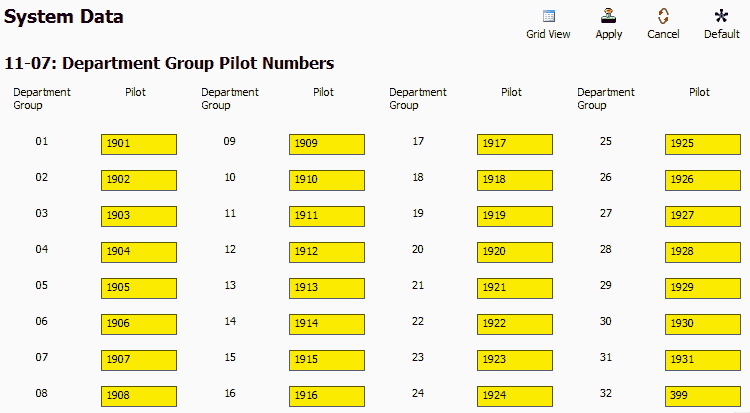
- Go to Program 11-07: Department Group Pilot Numbers ⚠️ Note:
By default:- Department Groups 01–31 = 3101–3131
- Department Group 32 (voicemail) = 3999
- Set:
- Groups 01–31:
1901to1931 - Group 32 (Voicemail):
399
- Groups 01–31:
Reset Extension Numbering
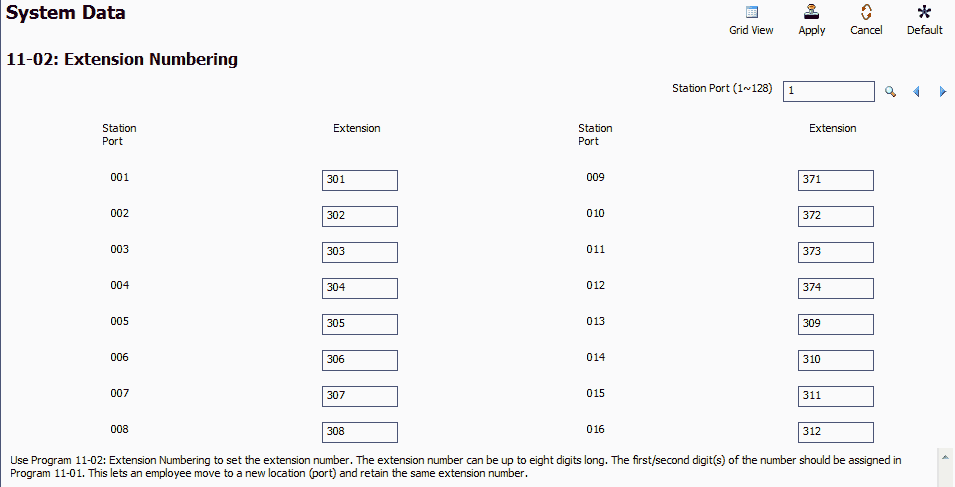
- Go to Program 11-02: Extension Numbering
- Assign new extension numbers to station ports as follows:
• Ports 1–8 = Digital ports on main board
• Ports 9–12 = SLI analog ports (labeled SLI 9–12/DPH 1–2)
• Ports 13+ = Dynamically assigned to additional (digital or analog) station cards if they exist. They can also be assigned to the VoIP DB card to be used for VoIP extensions.
Call Forwarding Setup (to Voicemail)
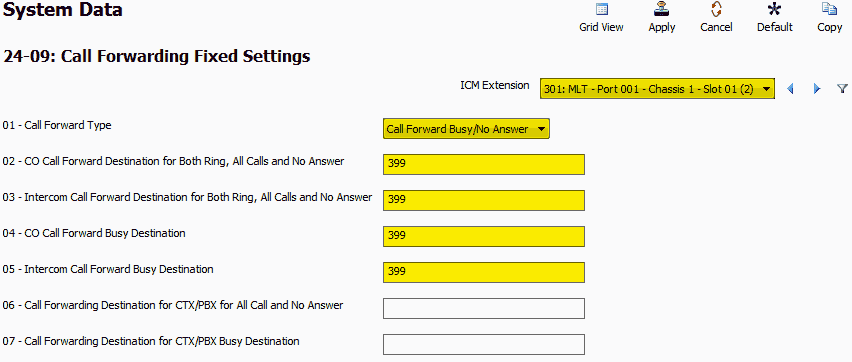
- Go to Program 24-09: Call Forwarding Fixed Settings
- Use the ICM Extension dropdown to select an extension
- Set:
- 24-09-01:
Call Forward Busy / No Answer - 24-09-02 to 24-09-05:
399
- 24-09-01:
InMail Dial Action Tables
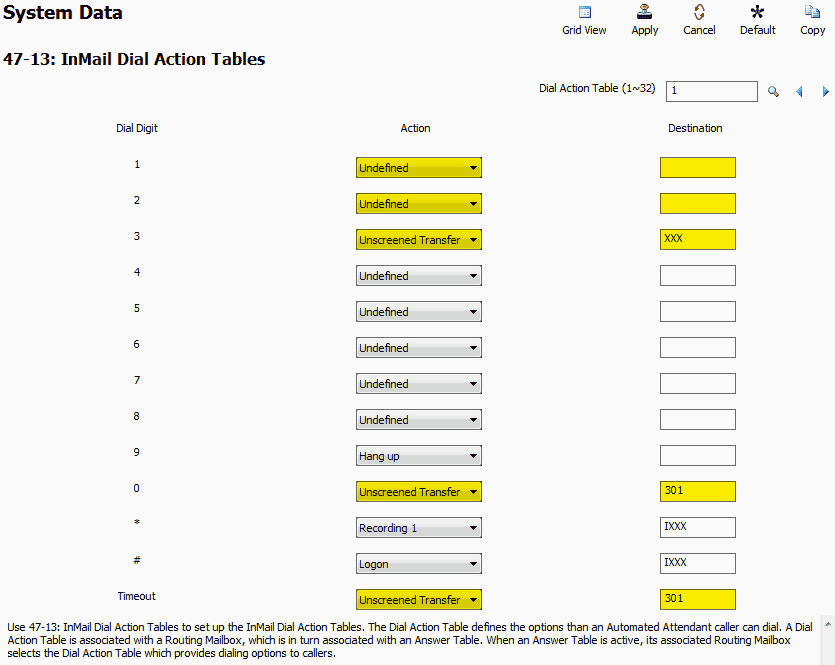
- Go to Program 47-13: InMail Dial Action Tables
- Update the following values: • Digit 1: Action =
Undefined, Destination = Leave Blank
• Digit 2: Action =Undefined, Destination = Leave Blank
• Digit 3: Action =Unscreened Transfer, Destination =XXX
• Digit 0: Action =Unscreened Transfer, Destination =301
• Timeout: Action =Unscreened Transfer, Destination =301
Apply and Upload Your Changes
Once complete, apply your settings and upload them to the phone system to finalize the renumbering.