
This Tech Tip will demonstrate how to program an Announcement Mailbox Option from a Dial Actions Table. This is commonly used to play informational messages such as business hours, directions, or other non-interactive announcements.. This tip applies to the NEC SL2100 and NEC SL1100.
Get Connected
This procedure requires access to the NEC SL2100 using the PCPro Programming Software.
To download PCPro or learn how to connect to the phone system, refer to:
How to Connect to the NEC SL2100 or SL1100 Phone System for Programming
Prerequisites
Before continuing, ensure you’ve already completed one of the following configurations:
- Programming a Full-Time Voicemail Attendant on an NEC SL1100
- Programming a 24/7 Part-Time Voicemail Attendant on an NEC SL1100
PCPro Programming Steps
Step 1: Define the Announcement Mailbox
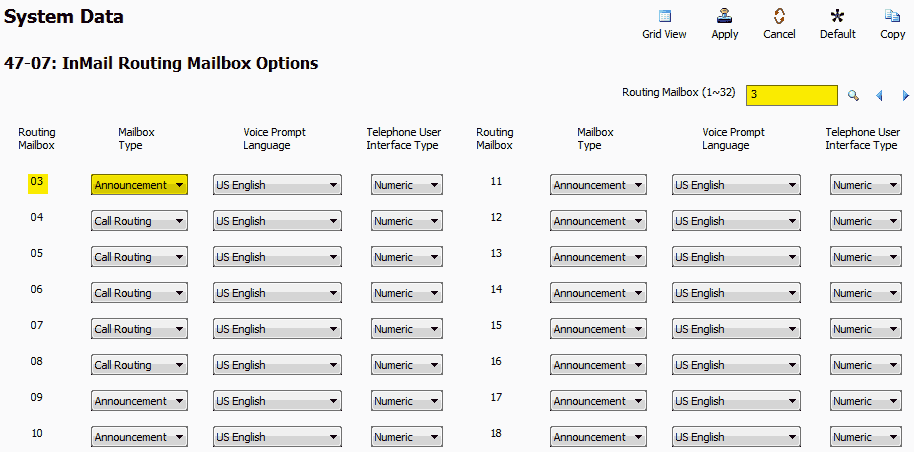
- Go to Program 47-07: InMail Routing Mailbox Options
- For Routing Mailbox 03, set Mailbox Type to
Announcement
Step 2: Set Repeat Behavior
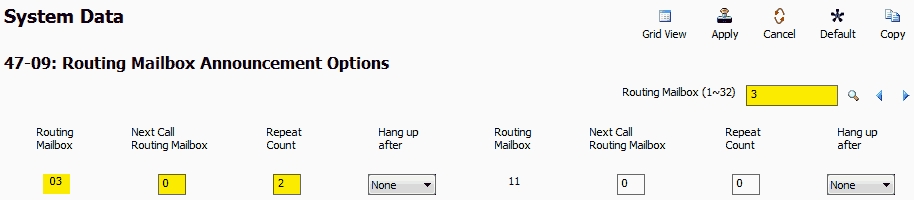
- Go to Program 47-09: Routing Mailbox Announcement Options
- For Routing Mailbox 03, configure the following:
- Next Call Routing Mailbox:
0 - Repeat Count:
2This allows the caller to hear the message twice before the system disconnects, preventing line tie-up.
- Next Call Routing Mailbox:
Step 3: Assign the Digit in Dial Action Table
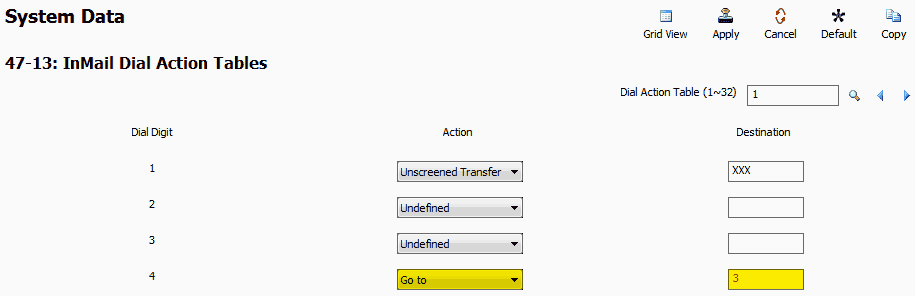
- Go to Program 47-13: InMail Dial Action Tables
- Choose the digit the caller will press to hear the announcement Example:
Digit 4 - Set the following values:
- Action:
Go to - Destination:
3This routes the caller to Routing Mailbox 3, which we defined as an Announcement Mailbox.
- Action:
Recording the Announcement Message
These steps must be completed from Extension 101
- Press the VM soft key
- Dial
72on the keypad (72 = SA) (System Administrator) - Press the Annc (Announcement) soft key
- Enter the mailbox number of the defined Announcement Mailbox Example:
003 - Press the Rec soft key to begin recording
- Press
#when done recording
Apply and Upload Your Changes
Once all programming and recording are complete, upload the configuration to activate the Announcement Mailbox.