This Tech Tip explains how to identify and resolve IP address conflicts on the NEC SL2100 (and SL1100) phone systems. These conflicts often occur when a static IP is used in a DHCP network without proper configuration, causing other devices to share the same IP address as the phone system and leading to unpredictable behavior and connection issues.
Common Signs and Symptoms of IP Conflicts
Phones Will Not Initialize:
If a multiline phone gets stuck at “Initializing” and never fully boots, this is a sign of an IP conflict.
Random Disconnects or Inability to Connect:
When two devices share the same IP address, they interfere with one another’s traffic. This can cause PCPro to disconnect unexpectedly or prevent a connection to the phone system entirely.
Only Able to Connect with Direct Connection:
If you cannot connect through the network, try a direct connection: plug your PC’s Ethernet port directly into the system’s LAN or VOIP port using a patch cable. You may need to adjust your PC’s IP settings. If this works (but connecting through the network doesn’t) it likely confirms an IP conflict.
Resolving an IP Conflict
- Assign a new static IP address to the phone system that does not conflict with other devices.
- Higher-numbered IPs (e.g.,
xxx.xxx.xxx.250–254) are usually safer because most DHCP servers start assigning addresses from the lower end of the range.
- Higher-numbered IPs (e.g.,
- Create a DHCP reservation for that new IP address in your network’s router or DHCP server.
- This ensures no other device can be assigned the same address.
Using System Alarms to Detect IP Conflicts
Both the NEC SL2100 and SL1100 can detect IP collisions and set system alarms.
To check for alarms:
- Log in to WebPro and look for IP Collision Alarms on the home screen.
Displaying IP Conflict Alarms on a Phone
To have alarms show up directly on a digital phone:
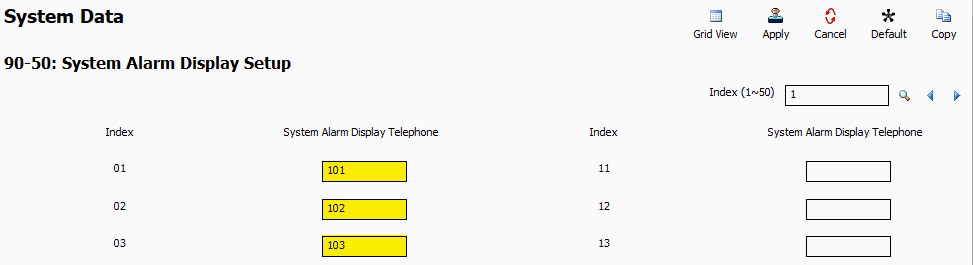
- Go to Program 90-50: System Alarm Display Setup
- In the System Alarm Display Telephone fields, enter the extension numbers of the multiline phones that should display alarms.
- Once configured, any IP conflict will display on those phones as the condition occurs.