
This Tech Tip demonstrates two ways to create personal speed dial numbers with names.
- Example 1 uses the NEC PCPro Programming Software
- Example 2 uses an SL2100 phone
This tip applies to both the NEC SL2100 and NEC SL1100 Phone Systems.
Get Connected with PCPro
This Tech Tip requires access to the phone system using NEC PCPro Programming Software.
Need help connecting?
How to Connect to the NEC SL2100 or SL1100 Phone System for Programming
Creating the Personal Speed Dials
Example 1: Using PCPro
- Go to Program 13-06: Station Speed Dial Number and Name
- Use the Extension drop-down menu to select the desired extension
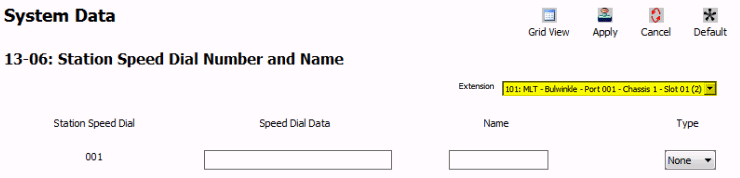
- For each station speed dial, set the following fields:
- Speed Dial Data: 10-digit phone number
‼️ Important: Include the trunk access code (9) before the number
Example:95551231234 - Name: Name of the speed dial (12 characters max)
- Type: The type of speed dial (Corporation, Mobile, VM, Home, etc.)
- Speed Dial Data: 10-digit phone number
- Repeat for each station
- Apply and upload your changes
⚠️ Tip: Each station can have up to 100 personal speed dials
Example 2: Using an NEC SL2100 Phone
Perform the following steps from an idle SL2100 phone that is connected to the phone system.
- Press the
Menusoft key - Dial
71 - Press the
Selectsoft key- The screen will display
00:Empty
- The screen will display
- Press the
Selectsoft key again- The screen will display
Number:
- The screen will display
- Enter the phone number using the dial pad
‼️ Important: Type the trunk access code (9) first
Example:95551231234
(For internal numbers, enter the extension only) - Press the
Nextsoft key to go to the Name field - Use the dial pad to type the Speed dial name
- For the letter B, press
2two times. For the letter S, press7four times - Press
#to accept a letter and move the cursor - Press
##to insert a space - Press the
Cancelsoft key to start over
- For the letter B, press
- Press the
Savesoft key - Press the
Exitsoft key
How to Use the Personal Speed Dials
From an SL2100 phone:
- Press the bottom key of the round navigation disk
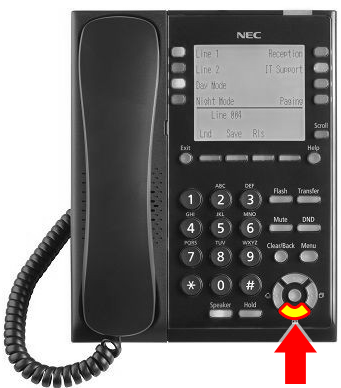
- Use the dial pad to type the first letter of the name
- Press the bottom key again to scroll through results
- Press
Speakeror lift the handset to dial
Note: Your personal speed dial numbers will not appear on another extension’s directory