
Setting up E911 alarm and display notifications is required to comply with Kari’s Law, which mandates that emergency calls made from multi-line telephone systems must notify a central location of the calling party.
This feature allows you to display the extension name and number of the user who dialed 911, and sound an alarm on all designated SL2100 or SL1100 multiline phones. At the same time, the 911 call is sent to the emergency center.
This Tech Tip applies to both the NEC SL2100 and NEC SL1100 phone systems.
Overview
The increased use of off-site or home-office IP phones creates potential safety risks when dialing 911. Behavior differs by trunk type:
- Analog trunks: Off-site phones cannot send the correct physical address to 911 dispatch
- SIP trunks: Can transmit an off-site address, but must be properly configured with the provider
- PRI trunks: Can send a specific DID, but it’s up to the carrier to associate that number with a location
Given these limitations, you can use the E911 notification feature to alert internal multiline telephones when someone dials 911. Designated phones will:
- Display the caller’s extension number and name
- Sound an alert tone
- Allow any receiving station to cancel the alert with a code
Get Connected with PCPro
This procedure requires access to the NEC SL2100 using the PCPro Programming Software.
To download PCPro or learn how to connect to the phone system, refer to:
How to Connect to the NEC SL2100 or SL1100 Phone System for Programming
Programming Steps
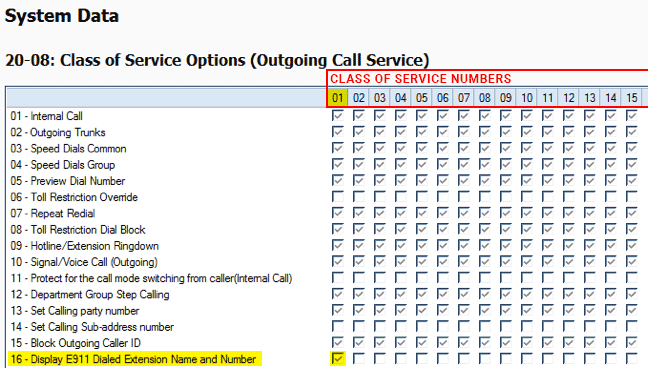
1. Assigning E911 to a Class of Service
- Go to Program 20-08: Class of Service Options
- Check Item 16 for the Class of Service that will support E911 notification
- Apply your changes
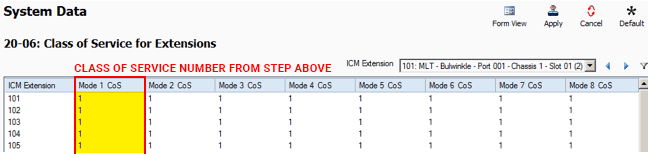
2. Assigning Extensions to the E911 Class of Service
- Go to Program 20-06: Class of Service for Extensions
- Use the ICM Extension dropdown menu to select the desired extension(s)
- Assign the same Class of Service number from the previous step
- Apply your changes
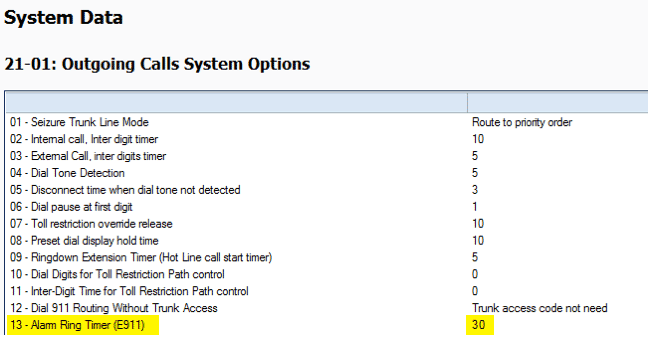
3. Setting the Alarm Ring Timer
- Go to Program 21-01: Outgoing Calls System Options
- Use Option 13 – Alarm Ring Timer (E911) to set the alarm duration in seconds
- Apply and upload your changes
4. Setting the Alarm Shut-Off Code
- Go to Program 11-12: Service Code Setup
- Verify the shut-off code for the alarm
- Default:
786
- Default:

Operation
When a user dials 911:
- All stations assigned to the E911 notification Class of Service will ring
- Their LCD displays the extension number and name of the 911 caller
To silence the alarm tone:
- Any receiving station in the same Class of Service can dial
786 - Press the EXIT key to clear the LCD