
This Tech Tip will demonstrate how to upload System Firmware to the NEC SL2100 phone system – but remember, our systems always come pre-loaded with the newest firmware, right out of the box!
Important
❗We strongly recommend backing up your current system programming before performing a firmware update.
Get Connected
This procedure requires access to the NEC SL2100 using the PCPro Programming Software.
To download PCPro or learn how to connect to the phone system, refer to:
How to Connect to the NEC SL2100 or SL1100 Phone System for Programming
PCPro Programming Steps
- Go to the Home tab in PCPro
- Click the Upgrade SW button

- In the pop-up window, select Firmware Update From PCPro
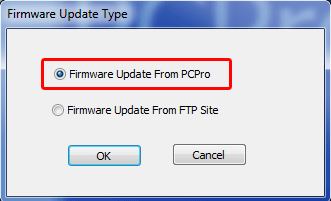
- Click OK
- In the Firmware Update pop-up window, click Browse next to the File field and select the firmware package from your PC
- Schedule the update:
- Immediately after upload: The update begins as soon as the file finishes uploading
- At the time of: Choose a specific date and time for the update to take place
- Click Run
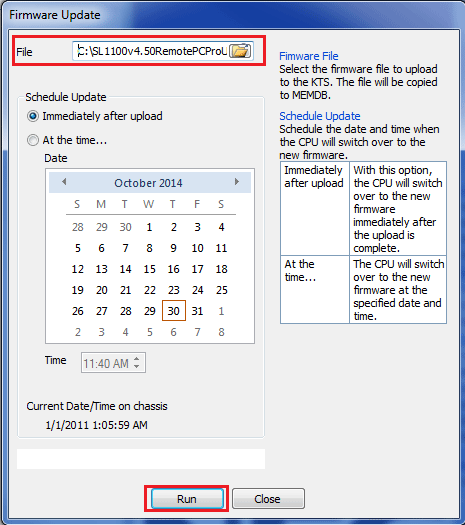
Note: If you choose Immediately after upload, the KSU will reboot after uploading. PCPro will show a connection lost error, this is expected behavior.
- Once the system returns to normal operation, press
Menuat any extension, dial93, then pressSelectto verify the software version
WebPro Programming Steps
- Log in to WebPro
- Click the Maintenance icon (wrench)
- In the left sidebar, click Software Update
- Under Manual Update, click Browse to select your firmware package
- Schedule the update:
- Immediately Reset: Starts the update immediately and resets the system after uploading
- Schedule Reset: Allows you to set a specific date and time for the update
- Click Start
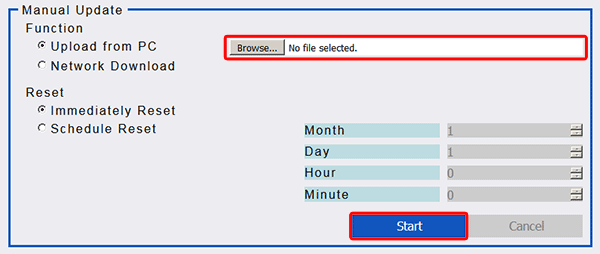
Once complete, the progress bar will display Completed
Note: If you selected Immediately Reset, do not click anything further, the system will reboot on its own.
- After the system comes back online, press
Menuat any extension, dial93, then pressSelectto verify the software version